Content Audit
A content audit is making an inventory of all content in a digital product, either of an existing application or a future application.
- We mostly perform a content audit on existing content-heavy applications.
- A content audit in itself yields a large list describing all content of a product.
- The content inventory can form the basis for restructuring the content of an application in a redesign project.
- Content audits are performed early in the process, before designing functionality or form, to ensure a content-first approach.
How to
1. Create a list of your content assets
#### **#1: Create a List of Your Content Assets**First, you need to make a list that contains all the data you need. You need to see your content assets and associated data all in one place. This will allow you to move methodically as you compare, prioritize, and update each asset.
I mentioned a few tools that will pull the content data for you. A quick Google search will uncover more. Note that some of these have a trial period, after which you have to pay for ongoing crawling and inventory updating. For very large websites, this may be worth the cost. For others, you may just want to pull the data and move on. Some websites may be small enough for you to take inventory yourself.
However you approach it, make a spreadsheet, which will allow you to list not only the links to the content, but also the meta data, descriptions, word count, creator, date posted, and more. Here’s a snapshot of a quick Google Spreadsheet you can make for your content audit.

2. Create a list of issues
After you’ve made your comprehensive content spreadsheet, it’s time to analyze it. What’s sticking out as a major problem or gap? Where are some factors that you can address right away to improve how your website is performing?Again, go back to your goals. Are you trying to improve technical SEO? Are you evaluating your content strategy to create better content moving forward?
Some issues will have overlap, improving all areas of your content as you update them. Here are a few things to look for:
Duplicate Content: Search engines prioritize fresh content. If you have a lot of duplicate content living on different pages or posts, you’ll want to go back and fix that so there isn’t repetition.
Outdated Content: This is important from a personal and technical perspective. People don’t want to read outdated content, and search engines overlook it too.
Evergreen Content: On the other hand, evergreen content can be a versatile tool in your content toolbox, providing relevant information to customers anytime. Identifying your evergreen content will let you make use of them by sharing them again and to refresh and update it as needed.
Content Gaps: What’s missing in your content? Are there topics you haven’t addressed yet? Target markets you haven’t spoken to? Being able to look at everything at once can help you find the gaps, and fill them in.
Target Keyword: In your spreadsheet, you can include target keywords that pieces of content were meant to address, and how well they were incorporated. You can also do some keyword analysis to ensure you are incorporating effective keywords and continue to do so in the future.
Meta Data: Have you written metadata descriptions for all pages? This spreadsheet is going to help you see which ones need to be written and which ones are repetitive and should be updated.
Image Data: Do you have alt texts on them? Now’s a good time to make sure your images are SEO and accessibility friendly. Complete the alt text for the title and description of the images you use.
Word Count: Do your pages and posts have enough words to optimize for SEO? Or are they too long? Check that word count to see if pages need to be updated or edited down.
3. Address content issues
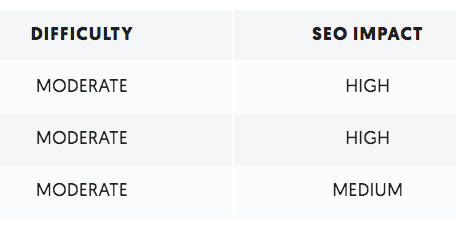
You can’t do everything at once, so take your list and start to prioritize based on how critical each issue is and how time consuming or difficult it will be to address it.When you run an SEO audit on Ubersuggest, as I showed above, you’ll receive recommendations with these priority factors listed. You can use that as a guide for all your content issues. Here’s a review of how they are ranked on UberSuggest.\
Content templates
Tips
- When making the inventory, you don’t have to document all content details straight away. You can start with basic information (like link name, page name). Then go back to add more details when you have covered the whole content structure.
- Finish one section of the application before moving to the next, to avoid getting lost or missing parts. Make a standard order to cover all links on one page, for example from left to right, top to bottom, to make sure you cover everything.
- Reflect the hierarchy of the application you’re auditing in your spreadsheet. For example use numbering, indents or colour-coding to indicate main- and sub-pages.
- In some situations it can help to make a sitemap out of your spreadsheet, to visualise the sites existing content structure.
- After collecting all content (topics) in a spreadsheet, you can create an improved content structure in a card sorting exercise. This is also a good moment do get rid of duplicate or outdated content.
What do you need?
| Tools | People | Time |
|---|---|---|
| Preferably a large screen, or 2 separate screens | Interaction designer | 2 hours - 2 weeks depending on the size of the application |
| A spreadsheet |
Learn more
- https://neilpatel.com/blog/content-audit/
- How to conduct a content audit by Donna Spencer (article)
- How to conduct a content audit by Donna Spencer (video)
- A Practical Guide to Information Architecture by Donna Spencer