Design sprint
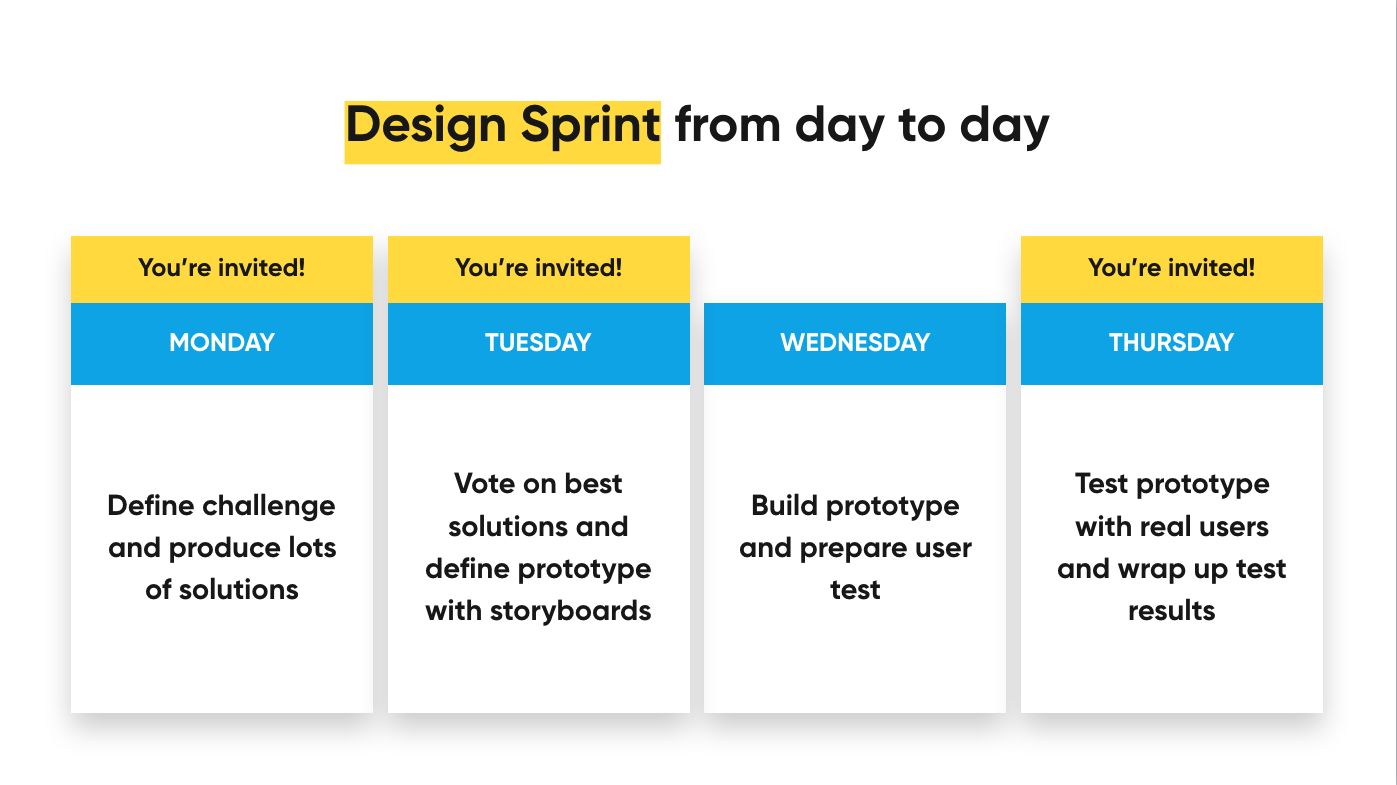
The Design sprint at Hike One follows the four day programme. This differs from the schedule as laid out by Jake Knapp in the book, but most activities remain the same. The week is built up as follows:
Why should you organize a Sprint?
Create meaningful results from scratch: Sprint is a great approach for getting quick results in just a short period of time. Developed at Google Ventures, it is a great process to start a project, getting unstuck or accelerating projects that are already in motion.
The sprint is a four-day process for answering critical business questions through design, prototyping, and testing ideas with customers. Working together with companies, product-owners and other stake-holders, we shortcut the usual endless-debate cycle and compress months of time into a single week. Instead of waiting to launch a product to understand if an idea is any good, we tend to quickly learn from users that test a prototype that we build in one week.
You can use Sprints for new websites, apps and all kind of (digital) products. It’s designed to take extra risk, whithout the risk of losing a lot of money. So if your client needs a small update on his product or just wants a concept visualised for a new idea, ask yourself if they really need a Sprint. Check with other facilitators or the Design Sprint method owner (Oscar) to be sure.
New to Sprints? Hike One did sprints for Urban Arrow, Philips.com, Buienradar, Dümmen Orange, PostNL concept, Delta, Ziggo Zakelijk, Drop & fly and many more.
Remote or non-remote sprint?
During times of Covid we did a lot of remote sprints, and used Miro extensively. Remote sprints have the added benefit of less travel time, less preparation stress and all notes digitalized immediately. Downsides include less fun and interviews that have to be done remotely as well.
If you are not sure what to choose, consult some of your fellow facilitators.
Who is involved?
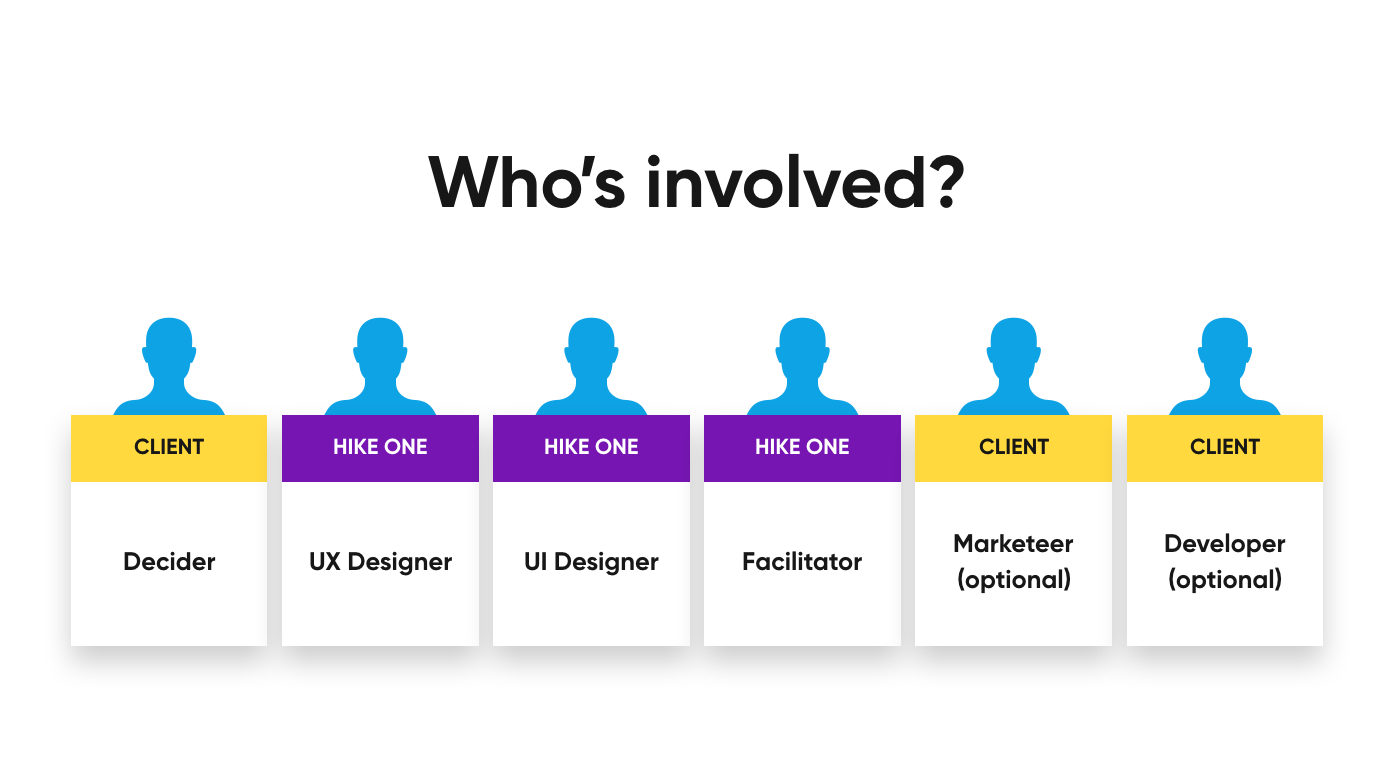
The ideal sprint team is between four and seven people. Next to a few prototypers (usually an interaction- and visual designer), try to include the following roles:
Decider
The decider is the one who makes all the tough decisions. He or she needs to have a deep understanding of the problem you are trying to solve. And more importantly: they need to have mandate from the company to decide on a direction for the product - you cannot afford to have a decider go out for consultation whenever a difficult decision needs to be made. Often the decider role is filled by a product owner, product manager, owner or CEO - but heads of customer service, lead engineers, and sales execs have also filled this role on occasions.
Prototyper(s)
It is recommended to have at least two or three prototypers in your team: people who can contribute to visualising and building the prototype. Prototypers can be designers, user experts, marketing experts, developers etc. It is recommended to include at least one designer - someone who looks at the issues at hand differently from people that are working on the product from day-to-day.
Facilitator
The facilitator is in charge of the process. He or she will lead the discussions, ensures the team sticks to the schedule and preserves the team's energy by scheduling enough breaks and initiating energisers.
How to decide who participates
The rule of thumb is: if they can contribute to the prototyping on Wednesday it's probably a good idea to invite them. For everybody else: include them by either inviting them as experts on Monday or invite them to observe during the usability test on Thursday.
Preparation
Selling a Design Sprint
Ideally, the facilitator is involved in the very first step in the process (selling a Design Sprint). That way the facilitator, who knows all about the Design Sprint, can help decide if the project at hand could be started with a Design Sprint. If in doubt, discuss with the Design Sprint method owner (at this moment: Oscar). Here's a slidedeck I used recently to sell a DesignSprint, but ask Oscar anytime if you have any questions.
Meet with your decider & Inventory workshop
Before you start your sprint, try to meet with your client. Do this well ahead of time, preferably 2-3 weeks. Often the product owner / client is also the decider in the design sprint, but this doesn't have to be the case. Try to get insights on the project and find out why they want to do a design sprint.
With the four day sprint, there is less time especially on the Monday morning. Therefore in most cases we do a 2,5 hour Inventory workshop at least one week before the Sprint. In this workshop the entire sprint team is asked to join. The facilitator explains how a Design Sprint works, and we do a workshop to interview the Decider and team members. The goal is to end with a well defined Sprint challenge.
To make sure you cover all of the important topics (about the subject as well as about all practicalities) use the presentation slides to help guide the Inventory workshop. Afterwards, note the agreements down in an email, dropbox paper or document, using the e-mail format provided.
Download: [Design Sprint - Facilitator guide](https://drive.google.com/file/d/1YLnZOITdBbQzNzaWPmJ39XPSz8mOj0oL/view?usp=sharing) _(Hike One only)_
Download: [Design Sprint - Inventory slides](https://docs.google.com/presentation/d/19ksSgC08GIZifD_7vpmNtrK86GnHUip1QYJOzSUsoPU/edit?usp=sharing) _(Hike One only)_
Miro template: [Miro board](https://miro.com/app/board/o9J_lmJtzYI=/) _(view only)_
Read: How write a [design challenge](https://www.linkedin.com/pulse/build-a-sprint-challenge-10-seconds-less-claire-shapiro/) _(article)_
Find the latest version of these files on Google Drive (Hike One only)
What to ask?
If it concerns an existing project, try to ask for:
- How long ago was the current product created?
- What were the goals back then?
- Were those goals met?
- What kind of business goals weren’t met?
- What worked really well, what didn’t?
- What are users struggling with?
Does it concern a new opportunity?
- What are the goals of this project
- Long term visions
- Is there a roadmap or a 'in 10 years' vision?
- What have you done so far?
- Who is your target audience?
Other topics:
- Can they provide relevant previous research, persona's etc.
- Discuss stakeholders and their possible roles throughout the sprint (core team / expert / observer).
- Discuss the location for the design sprint. You'll need a good 'war room'.
- Discuss the experts to invite.
- Start thinking about participants for the test.
- Plan a prepping day to dive into research and meet with the Product Owner.
- Plan a presentation date for after the sprint.
Invite the experts
On day one we interview 1-3 experts that can bring input on the table. You interview them and based on their input your Sprint will take shape. The experts are people that are on top of things like: distribution, product development, engineering, customer service, project manager, etc.We invite them for interviews — can also be done by phone — and they don’t have to prepare anything. If they have something important to show the can bring it with. Make sure you invite them well before the Sprint starts. If there are no experts? Postpone your sprint and rethink your options.
Design Sprint week
Day 1 (Monday): Define
Monday is used to gather insights, define the challenge, choose a target and create possible solutions.
You always start your sprint with a short kick-off to introduce yourself, the team, the sprint program and have the decider present the challenge. The rest of the first day is about sharing information and creating a shared understanding.
[Design Sprint Monday](https://docs.google.com/presentation/d/1i137yZ2jhN5C6A4vDWy2bK1Q3JT25-3Wuue5BfnpBzE/edit?usp=sharing) _(Hike One only)_
Find the latest version of these files on Google Drive (Hike One only)
Day 2 (Tuesday): Decide
Tuesday is all about narrowing down all the solutions towards one single solution with the best ideas. You will do this without endless group discussions.
[Design Sprint Tuesday](https://docs.google.com/presentation/d/1h-xT2jmcVMYMcgWUT6Xzde-31Nugxd--qJlDIx7mmtM/edit?usp=sharing) _(Hike One only)_
Find the latest version of these files on Google Drive (Hike One only)
Day 3 (Wednesday): Prototype
On Wednesday you will create a prototype for the chosen solution. You will use the skills available in the team to create something that will look realistic enough to get honest feedback from users.
Day 4 (Thursday): Test
On the 4th day of the sprint you will hold up your designs to actual user. The feedback you gather will help decide if the chosen direction is something worth pursuing further and/or what needs to be improved to get there.
Miro template: [Miro board](https://miro.com/app/board/o9J_lmJtzYI=/) _(also useful when doing your Design Sprint in-person)_
Best practices
These best practices are gathered from retrospectives. This is not a design sprint manual, just a few extra suggestions.
Monday (define)
- Make use of the slide decks for Monday and Tuesday for a smooth process.
- Make sure you have good clear schedules of the day planning each day
- Use the XL post-its or a flipover to capture the lightning demo’s
- As facilitator, check the solution sketches when they are handed in. If the sketch is not self-explanatory, give the creator some pointers on how they can improve it. This will save a lot of time and frustrations the next day.
- Mapping exercise video https://www.youtube.com/watch?v=JTqCR84fzeg
- The Map is always a challenging assignment. You can create a map with the decision maker before the Sprint, and change it during the Sprint.
- Hide the solution sketches from other participants. You'll need the fresh eyes on Tuesday!
- Summarise the day in e-mail with your team. Very helpful for the next day.
- If you, as a team member, disagree with the facilitator. Try to discuss this one-on-one in a short break and not within the team room.
Tuesday (decide)
- Tuesday is the time to think about what tools we will be using for our prototype. We tend to pick up prototyping tools like Principle and Invision, but maybe a keynote will also do.
Wednesday (prototype)
- Be careful for designing too high fidelity, it’s a prototype - what are we trying to test?
- If your team is more than 2 designers, use Trello as a simple To Do list
- Think about collaboration and try to use tools like Realtimeboard and Figma
- Put your screens in a prototype as soon as possible and share them with the team. Even rough versions. This way the PO has early access to the prototype and can collect content, give input and feedback right away.
- If you use InVision, use the comment feature to receive feedback from the PO
- End the day a dry-run of your prototype. You will definitely find some bugs in the prototype or want to adjust your script. It is better to figure this out right now. Fix the script and bugs early Thursday morning.
- Remind the team to be on time tomorrow, you need all the time to prepare the test.
- On the prototyping day some team members might be less active in design as, well, they are not designers. Some suggestions on what they can pick up:
- Write the test scenario.
- Arrange other things for Thursday (participant gifts?)
- Write copy for in the prototype
- Find images to use in the prototype
- Show 1 or 2 important stakeholders what we are doing by showing them around the Sprint room
Thursday (test)
- Be very early in the office to get ready, its always stressful.
- Be sure to explain the decider what the usability test is. Sometimes the decider starts talking to the participants and telling them more than he should say. Usually, one of the designers does the interview.
- Don’t forget to ask/test your Sprint questions on the participants.
- You can switch interviewers so other designers can improve their interviewing techniques
- Notify security (send the schedule with participant names)
- Yes, you can change the user test questions and the prototype between participants if you see that it can be better. (However there is always a risk involved of breaking the prototype or the script not aligning properly. So be careful.)
- Write your observations on the proces down during the design sprint. Useful for the retrospective.
- At the end of each day, the facilitator sums up what happened and what the concrete results are. Keep it short! Everybody is tired.
Wrap-up
You've made it through the week! Good job!
Now it's time to look ahead; your work is not done yet. Here are a few things to keep track of after the week has finished.
Prepare a presentation
Summarise the sprint week, recap the challenge and sprint questions. Present the final design, optionally together with a highlight reel from the usability test. Finally lay out the findings from the usability test and possible follow-up steps.
If you are scheduled to make a report, check out some examples [here](https://drive.google.com/drive/folders/1jpZzRSLDKzE1NWBun0a55foM8TszgoO1?usp=sharing). _(Hike One only)_
Retrospective
Do a retrospective with the team the Monday or Tuesday after. Share the outcome with one of the writers of these Design sprint articles.
Share the prototype
Make sure you share the prototype and other material created throughout the week with your client. Sometimes it's also nice to share the prototype with your colleagues on Slack, if the project / client permits it.
Create a compilation video / highlights reel
It can be useful to create a compliation video with a few key moments from the interviews during the test day. A few suggestions for creating such a video:
- Choose up to 5 topics you want to highlight, good ones to include are:
- Sprint questions
- General reactions: “What do you think?”
- The most important pattern-clusters
- Choose fragments that validate the outcome (if the outcome was positive)
- Also mix in critical responses, to give examples of what we can improve and to be more credible.
- Try to only let the users talk, cut out the interview questions if possible
- Use title slides (black with white text)
- aim for max. 5-8 minutes total length
Think about the next steps
Discuss possible next steps with the decider and/or product owner/manager. Often the design sprint is followed up by an iteration sprint the further refine the solution before moving into production mode (scrum).
What do you need
| Tool |
|---|
| A3 paper |
| Design Sprint Suitcase |
| TimeTimer clock |
| Thick and small markers, pencils, etc. |
| Post-its (rectangle & xl) |
| Dot stickers in different colours |
| Tape |
| Usability test case (for the usability test on Thursday) |
| Bit Timer on your phone/tablet (for the Crazy 8s exercise, iOS only) |
| Brown paper (optional) |
| A role of Magic White Board (optional) |
Learn more
- Tips for facilitators on Sprint Stories
- Selling design sprints on Invision Blog
- AJ&Smart Design Sprint online masterclass videos
- How to make a Design Sprint test compilation video